LocalBox#
The LocalBox is a SQLite Database and a place where we store Metadata of pushed to RemoteBox Files.
Note
DecryptedLocalBox can be fully restored from DecryptedRemoteBox.
Tables#
LocalBox has four tables: BOX_DATA, FILES, PATH_PARTS and DEFAULTS.
BOX_DATA#
BOX_DATA store information about Box, Session, etc.
BOX_CHANNEL_ID |
BOX_CR_TIME |
BOX_SALT |
MAINKEY |
SESSION |
API_ID |
API_HASH |
FAST_SYNC_LAST_EVENT_ID |
|---|---|---|---|---|---|---|---|
BLOB |
BLOB |
BLOB |
BLOB|NULL |
BLOB |
BLOB |
BLOB |
BLOB |
BOX_CHANNEL_ID– Encrypted RemoteBox (Telegram channel) IDBOX_CR_TIME– Encrypted LocalBox creation timeBOX_SALT– BoxSalt for MainKey creationMAINKEY– Encrypted by BaseKey MainKey. Used if RemoteBox was clonedSESSION– Encrypted by BaseKey Telethon’s StringSessionAPI_ID– Encrypted by MainKey your API_ID from the my.telegram.org siteAPI_HASH– Encrypted by MainKey your API_HASH from the my.telegram.org siteFAST_SYNC_LAST_EVENT_ID– Last found on the fast syncing event ID
FILES#
FILES store information about uploaded to the RemoteBox files.
ID {PRIMARY_KEY} |
UPLOAD_TIME |
PPATH_HEAD |
FILEKEY |
FINGERPRINT |
METADATA |
UPDATED_METADATA |
|---|---|---|---|---|---|---|
INT |
BLOB |
BLOB |
BLOB|NULL |
BLOB |
BLOB |
BLOB|NULL |
Note
IDis a Telegram message ID. Must be unique as any SQLite PrimaryKeyPPATH_HEADis a path PartID of the last part (folder). See a “How does we store file paths”FILEKEYwill be notNULLonly when you import RemoteBox File from other’s RemoteBox. In this case it will be encrypted byMainKeyFINGERPRINTis, in short, a SHA256 over File path with file name plus Mainkey (make_file_fingerprint()), not a hash of file. We use it to check if some file was already uploaded to RemoteBox.We take
METADATAplus File IV from the RemoteBox File and place it to the LocalBox without changing anythingUPDATED_METADATAis a user changes ofMETADATA, encrypted and packed with the PackedAttributes algorithm (see Protocol)
DEFAULTS#
DEFAULTS store some of the default TGBOX values
METADATA_MAX |
FILE_PATH_MAX |
DOWNLOAD_PATH |
DEF_NO_FOLDER |
DEF_UNK_FOLDER |
|---|---|---|---|---|
INTEGER |
INTEGER |
TEXT |
TEXT |
TEXT |
Note
METADATA_MAXis the bytesize limit of the TGBOX file metadataFILE_PATH_MAXis the bytesize limit of the file pathDOWNLOAD_PATHis the default download pathDEF_NO_FOLDERis the default folder when file path is not specified on uploading/importingDEF_UNK_FOLDERis the default folder to which files will be placed on download ifhide_folderisTrue
PATH_PARTS#
PATH_PARTS store every path part in encrypted form with their IDs.
ENC_PART |
PART_ID {PRIMARY_KEY} |
PARENT_PART_ID |
|---|---|---|
BLOB |
BLOB |
BLOB|NULL |
Note
ENC_PARTis an encrypted byMainKeyPath PartPART_IDis Path Part ID (see How does we store file paths)PARENT_PART_IDis a Part ID of Parent path (see How does we store file paths)
How does we store file paths#
Every file in TGBOX (as well as in any OS) must have a file path. TGBOX should accept any path that pathlib.Path can support: the UNIX-like and Windows-like. So, let’s imagine that we have an abstract file called file.txt. It’s absolute (Unix-like) path will be /home/user/Documents. The RemoteBox File will store its path in a File Metadata as is. However, in the LocalBox we will store it more efficiently, in a Blockchain-like way.
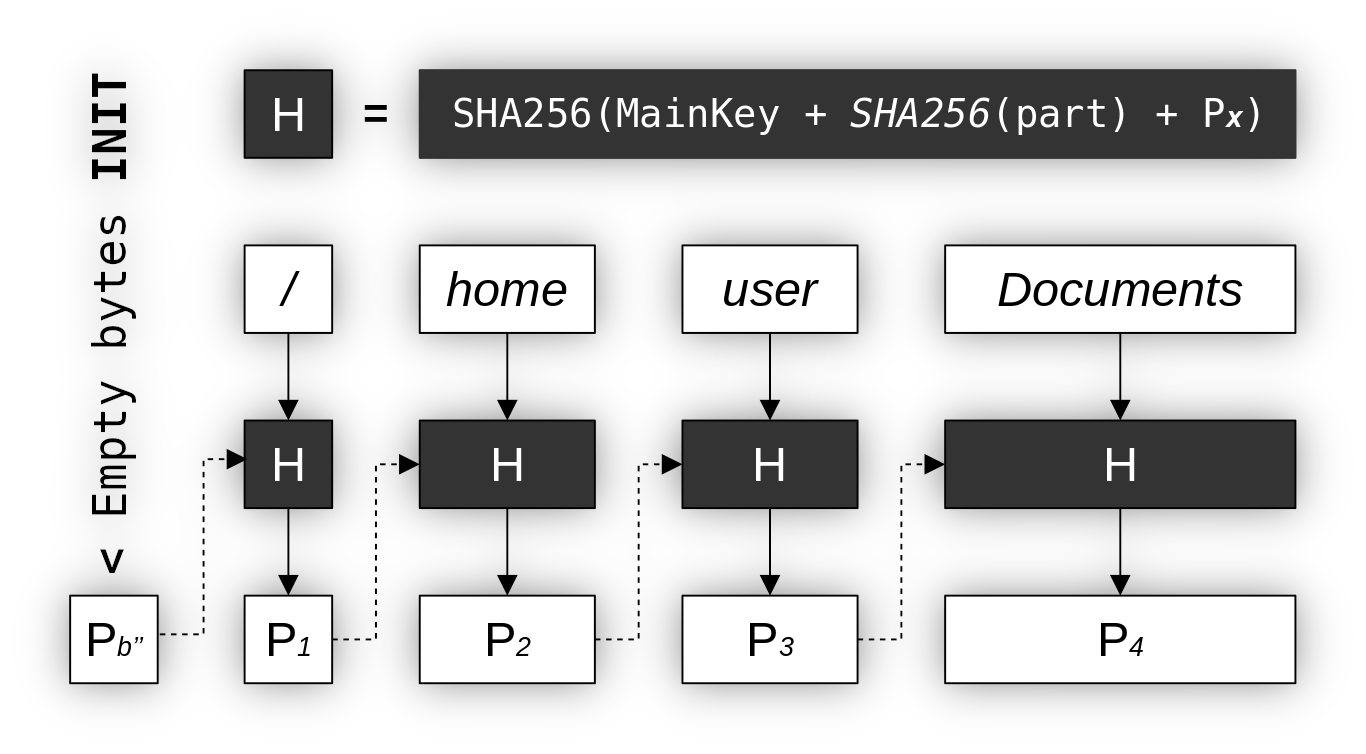
In this schema we split a File path by parts (/, home, …). A path anchor (/ in UNIX and i.e C:\ on Windows) is also considered a Path Part. Our goal here is to create a unique ID for each Path Part, and we complete it by hashing string concated from MainKey, SHA256 of Path Part (i.e user) and Parent Part ID (in this schema, the Parent Part ID is Px). For a first Path Part we use empty bytestring (b'' as P₀), as there is currently no parent.
Path Part ID generator in Python code
... # Some code was omitted

def ppart_id_generator(path: Path, mainkey: MainKey) -> Generator[tuple, None, None]:
    """
    This generator will iterate over path parts and
    yield their unique IDs. We will use this to better
    navigate over *abstract* Folders in the LocalBox.

    The path **shouldn't** contain a file name,
    otherwise directory will contain it as folder.

    */home/user/* is **OK**
    */home/user/file.txt* is **NOT**

    Will yield a tuple (PART, PARENT_PART_ID, PART_ID)
    """
    parent_part_id = b'' # The root (/ anchor) doesn't have parent
    for part in path.parts:
        part_id = sha256(
            mainkey\
          + sha256(part.encode()).digest()\
          + parent_part_id
        )
        yield (part, parent_part_id, part_id.digest())
        parent_part_id = part_id.digest()
Tip
See it in a tools module: tgbox.tools.ppart_id_generator().
Additionally, we encrypt the Path Part with a MainKey and store it with Part ID (Px) and Parent Part ID (Px-1) in a PATH_PARTS table of LocalBox SQLite Database. In the default Protocol behaviour this process is initiated after user pushed file to RemoteBox, on saving Metadata to LocalBox. We make a Path Part IDs and insert data into PATH_PARTS table if it’s not contains this Part ID. When we store data of the File in the FILES table, we insert the last Part ID (or Path Part ID Head) into the FILES:PPATH_HEAD column (see FILES).
Why bother?#
All files with the same Directory will be linked to the unique Part ID. This gives us ability to quick-fetch all LocalBox Files that have the same File path. With this, we can reduce amount of files to search on. Let’s imagine that you’re a Linux user which share Box with a Windows user, and you want to find some file which was uploaded from the Windows. You can make a SearchFilter with a scope='C:\\' keyword argument. This will not fetch any of the files uploaded from Linux.
You can work at full with such Abstract Directories by using methods of DecryptedLocalBoxDirectory. For example, you can iterate over it with iterdir(), load parent Directory with lload() and so on. To get a Directory object you can use a get_directory() (or use contents()). Also, every DecryptedLocalBoxFile contains a directory property.
Note
Searching (or just getting) LocalBox Files filtered by SearchFilter with scope (or with contents()) is always better and typically more faster. We will not need to decrypt each File and compare it with other filters (this can be slow if you have a plenty of files, like, thousands).