Protocol
The TGBOX Protocol is a number of rules and algorithms that define how all of things (like Encryption, packing Metadata, File sharing & etc) work. As TGBOX is built around the Telegram messenger, we can call a TGBOX as an additional layer which adds more features.
Algorithms used in Encryption
For encryption, we use the AES CBC with 256 bit key. First 16 bytes of any encrypted by library data is IV;
For making the
BaseKey(an absolute key that is used to derive all sub-keys) we propose and use by default a Scrypt PBKDF;As hash function, we always use the SHA256;
For File and Box Sharing we propose and use by default ECDH on SECP256k1 curve.
Abstract Box
The Box is an object that have BoxSalt — 32 (usually random) bytes. With this Salt and user Passphrase we make base encryption key (see Encryption keys hierarchy).
The Box splits into two types, — the Remote (is a Telegram Channel) and Local (is a SQLite database). They have a two states, — the Encrypted (when Passphrase is not presented) and Decrypted.
The RemoteBox store encrypted Files and their Metadata. LocalBox store Metadata and Directories (see details in LocalBox).
The LocalBox can be fully restored from the RemoteBox if you have a decryption key (but this can take a little of time if you uploaded a big amount of files);
The Box can be shared with multiply users.
Abstract Box file
An abstract Box file is an object that have FileSalt — 32 random bytes. With this Salt and user Passphrase ->
BaseKey->MainKeywe used to make a file encryption key. Started from the version 1.3 we make a file encryption key with theDirectoryKeyand FileSalt. See details in Encryption keys hierarchy;The Box file has Metadata (see Box file & its Metadata);
The Box file splits into two types, — the Remote (stored in a RemoteBox) and Local (metadata of the Remote file stored in a LocalBox). They have a two states, — the Encrypted (when
FileKeyis not presented) and Decrypted;The Box file can be shared with multiply users without giving key of the whole Box; the Requester will only have an access to requested file, and nothing more.
Encryption keys hierarchy
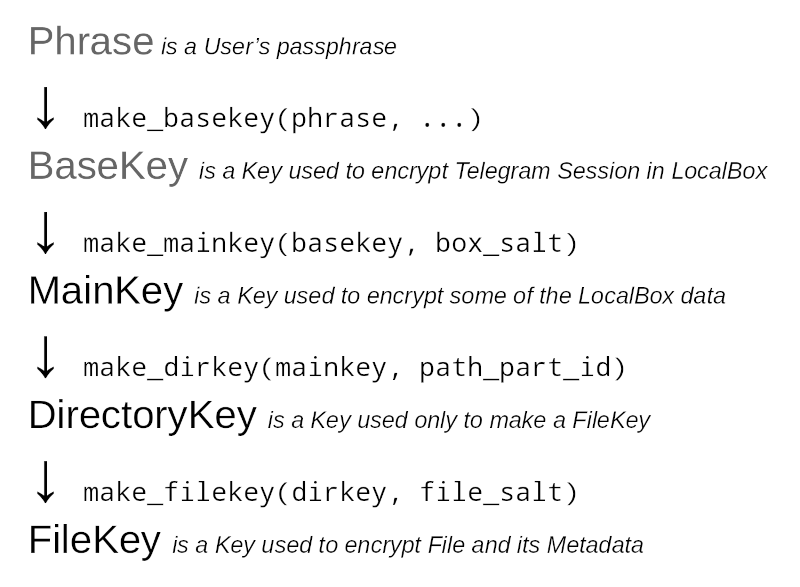
The Phrase →
Phrase is a User’s password or generated by Protocol API six random mnemonic words. There is a special class in the TGBOX that can make a phrase: tgbox.keys.Phrase. The Phrase is used to only create a BaseKey.
The BaseKey →
BaseKey is a master Key that is used to derive all other sub-keys. By default, we make this Key with a tgbox.keys.make_basekey() function, which utilize the Scrypt KDF under the hood and then hash result with SHA256. The Scrypt is configured to require a 1GB of RAM to make a key, and uses non unique salt: tgbox.defaults.Scrypt. Expirienced users may want to change it to make a brute-force attack impossible, but should not lost it (we do not store it in any way). Random Phrase or secure password should be just enough to protect your Box. You can wrap any other key in the BaseKey class if you want a different implementation.
We also use BaseKey to encrypt Telegram session (give an access to the Account) in the LocalBox.
The MainKey →
Note
You mostly will not need to use this and all next Keys directly, because it’s a Protocol business.
MainKey is a Key that is used to derive a directory keys and to encrypt some of the LocalBox data. When we start a “Box making” routine by firstly calling a make_remotebox() function (and then make_localbox()), we receive a 32 random bytes, – the BoxSalt. By concatenating and then hashing by SHA256 the MainKey with BoxSalt (tgbox.keys.make_mainkey()) we make a MainKey.
We also use MainKey to encrypt some of the data stored in RemoteBox file Metadata.
The DirectoryKey →
DirectoryKey is a Key that is used to derive a file keys. You may want to read the “How does we store file paths” in LocalBox firstly to understand it more clearly. In short, every File in the TGBOX (just as in any OS) has a file path. Every unique (case-sensitive) file path has it’s own DirectoryKey, and an every Part of the file path has it’s own ID, that is linked with the parent Part ID. To make a DirectoryKey, we need to have a Head Part ID (ID of last path part) and MainKey. Firstly, we hash a MainKey, then concate hashed MainKey with the Head Part ID, then hash it again. The final result is a DirectoryKey. See make_dirkey() source code.
In fact, the DirectoryKey is more a deterministic bytes than a Key. It doesn’t encrypt anything, but used only to make a file keys.
The FileKey
FileKey is a Key that is used to encrypt file and its Metadata. On prepare_file() we receive a 32 random bytes, – the FileSalt. Just identical to make_mainkey(), we make a FileKey with make_filekey(). Started from the version 1.3, to derive a file keys we use a DirectoryKey. For files that was uploaded prior to the v1.3, we use a MainKey.
Box file & its Metadata
On “uploading some file to the Box” routine, the target firstly goes through the prepare_file() function. In it, we verify that file is
valid and if it is, we construct the Box file Metadata, which consist of the next fields:
file_salt (bytes: required, public) – FileSalt is used for FileKey creation
box_salt (bytes: required, public) – BoxSalt is used for MainKey creation
file_fingerprint (bytes: v1.1+, public) – A SHA256 of the File’s path plus MainKey
efile_path (bytes: v1.3+, public) – Encrypted (by MainKey) File’s path
minor (int: v1.3+, public) – The minor version of the TGBOX protocol
file_name (bytes: required, secret) – File’s name
file_size (int: required, secret) – Pure file’s size, no metadata included
duration (float: optional, FFMPEG required, secret) – File’s duration (if video/audio)
preview (bytes: optional, FFMPEG required, secret) – File’s preview (if file is media)
mime (bytes: required, secret) – File’s mime type
- Unpacked Metadata also have some fixed bytes at the beginning, which consist of the:
prefix – Bytes to identify the TGBOX encrypted file
verbyte – Protocol global version as one byte
metadata_size – Bytesize of the Metadata to unpack
Packing Algorithm
To pack a Key-Value container we use the simple algorithm, that in Protocol is called a PackedAttributes. The packed result here is combination of
Key length plus Key plus Value length plus Value (all values should be bytes) and so on. We store the Key/Value length in three bytes, so the maximum bytelength for each Key or Value is 16MiB-1.

from tgbox.tools import PackedAttributes

pattrs = PackedAttributes.pack(field=b'data', x=b'test')
# b'\xff\x00\x00\x05field\x00\x00\x04data\x00\x00\x01x\x00\x00\x04test'

print(PackedAttributes.unpack(pattrs))
# {'field': b'data', 'x': b'test'}
Metadata in depth
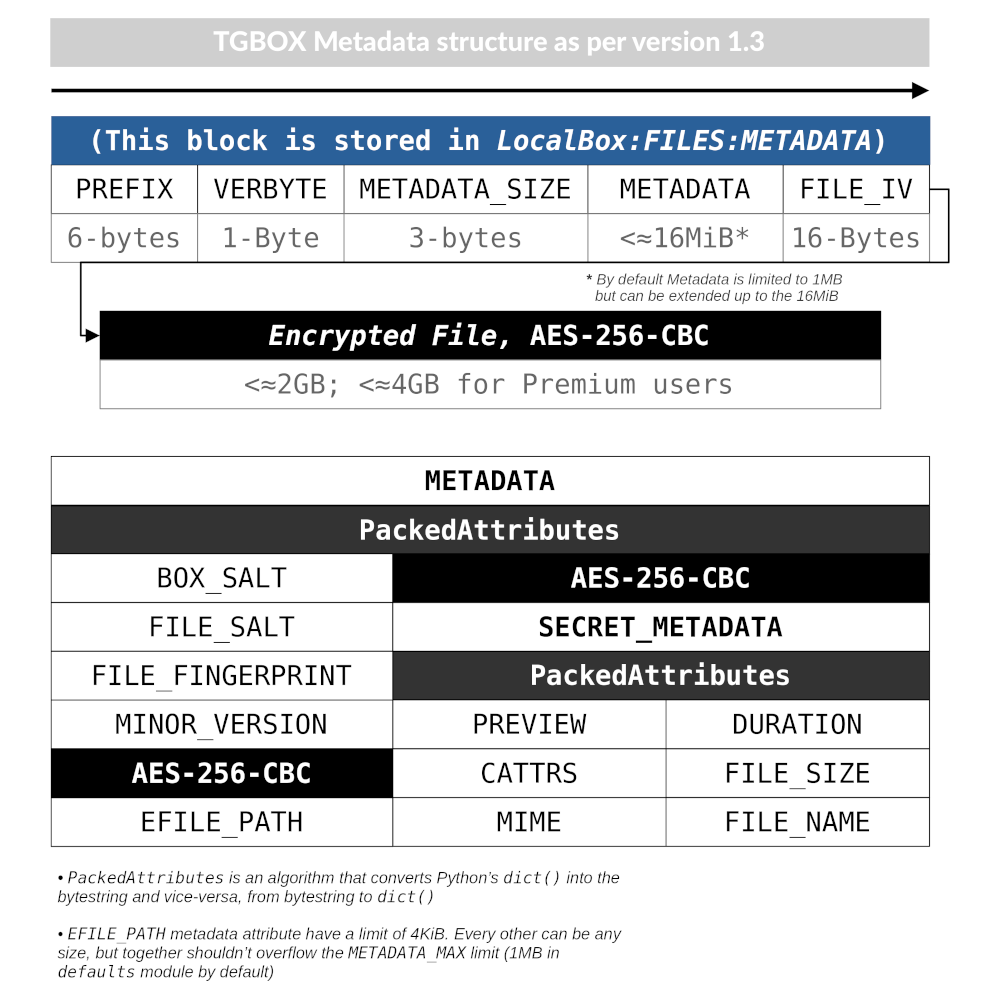
- On this schema:
Only Metadata keys shown;
The efile_path field is encrypted with MainKey. It is now a part of public Metadata, so we can decrypt it, make a DirectoryKey and then FileKey;
The secret_metadata field is encrypted with FileKey.
Note
Metadata is always placed in the start of the Box file.
Describing in Code
This code example will decrypt and parse example file that was uploaded in my public Box with disclosed MainKey. If you want to test a file from your Box, then you will need to make a MainKey.
How to make a MainKey from the Phrase
import tgbox, base64

# Copy BoxSalt from your Telegram Box Channel description
box_salt = '0000000000000000000000000000000000000000000='
box_salt = tgbox.crypto.BoxSalt(base64.urlsafe_b64decode(box_salt))

phrase = tgbox.keys.Phrase('very_secret_password')
basekey = tgbox.keys.make_basekey(phrase)

# You can use this MainKey & one of the File
# from your Box with the example code below
MAINKEY = tgbox.keys.make_mainkey(basekey, box_salt)
Warning
Never disclose Phrase or BaseKey! Share MainKey only via ShareKey and only if you want to share a Box with someone!
import pathlib, tgbox

# The MainKey of the example Box is already disclosed, see t.me/nontgbox_non
MAINKEY = tgbox.keys.Key.decode('MbxTyN4T2hzq4sb90YSfWB4uFtL03aIJjiITNUyTqdoU=')
# You need to download the encrypted example Box file: t.me/nontgbox_non/89
BOXFILE = open('LJNbud8SoQGlzZGRk6RkVbwT3eXC7hAaXZE6AeRView=','rb').read()

# There is PREFIX, VERBYTE and METADATA_SIZE which is always
# fixed in the first 10 bytes of the encrypted by Protocol file
FIXED_METADATA = BOXFILE[:10] # b'\x00TGBOX\x01\x00\x01}'

PREFIX = FIXED_METADATA[:6] # b'\x00TGBOX' (is signature)
VERBYTE = FIXED_METADATA[6:7] # b'\x01' (major Protocol version)

METADATA_SIZE = FIXED_METADATA[7:] # b'\x00\x01}' (size of the Metadata)
# Convert the bytes METADATA_SIZE to the integer type
METADATA_SIZE = tgbox.tools.bytes_to_int(METADATA_SIZE) # 381

# Actual Metadata goes after Fixed, so slice from 10 to METADATA_SIZE+10 (Fixed Metadata bytesize)
METADATA = BOXFILE[10:METADATA_SIZE+10] # b"\xff\x00\x00\x08box_salt\x00\x00 \x..>
UNPACKED_METADATA = tgbox.tools.PackedAttributes.unpack(METADATA) # {'box_salt': b'\xd3M4\xd3M4\xd3M4\xd3M4..>

# To decrypt the Secret Metadata we need to make a DirectoryKey, and
# then the FileKey, so firstly we will decrypt the efile_path and
# make a DirectoryKey from the last Path Part ID
file_path = tgbox.crypto.AESwState(MAINKEY).decrypt(UNPACKED_METADATA['efile_path'])
file_path = pathlib.Path(file_path.decode()) # '/home/tgbox/v1.3', ppart_id_generator require Path object

for path_part in tgbox.tools.ppart_id_generator(file_path, MAINKEY):
    part_id = path_part[2] # ppart_id_generator yields tuple

# Started from v1.3 we make FileKeys from DirectoryKey, not MainKey
dirkey = tgbox.keys.make_dirkey(MAINKEY, part_id)
# We make a FileKey from DirectoryKey and FileSalt (always in pub.Metadata)
filekey = tgbox.keys.make_filekey(dirkey, UNPACKED_METADATA['file_salt'])

secret_metadata = tgbox.crypto.AESwState(filekey).decrypt(UNPACKED_METADATA['secret_metadata']) # b'\xff\x00\x00\x07prev..>
secret_metadata = tgbox.tools.PackedAttributes.unpack(secret_metadata) # {'preview': b'', 'dur..>

print(secret_metadata)
Tip
The next code blocks can be inserted in the end of the code above
Prove that Metadata encryption is properly implemented
from subprocess import run as subprocess_run

# First 16 bytes of any encrypted by Protocol data is IV of AES CBC (256bit)
secret_metadata_iv = UNPACKED_METADATA['secret_metadata'][:16]

# Write the encrypted Secret Metadata (without IV!) to file
open('LJNbud_sm','wb').write(UNPACKED_METADATA['secret_metadata'][16:])

# You can < print(' '.join(subprocess_command)) > to get a CMD command
subprocess_command = ['openssl', 'aes-256-cbc', '-d', '-in', 'LJNbud_sm',
    '-K', filekey.hex(), '-iv', secret_metadata_iv.hex()]

sp_result = subprocess_run(subprocess_command, capture_output=True)
print(sp_result.stdout) # b'\xff\x00\x00\x07prev..>

# Compare the Unpacked Secret Metadata that was decrypted within Protocol code
# with the Unpacked Secret Metadata that was decrypted within OpenSSL 1.1.1n
print(tgbox.tools.PackedAttributes.unpack(sp_result.stdout) == secret_metadata) # True
# = Decrypt actual File ============================================ #

# Actual encrypted File (original file that was uploaded by user)
# position is FIXED_METADATA size (10, -- PREFIX + VERBYTE +
# METADATA_SIZE) plus METADATA_SIZE (integer)
encrypted_file_pos = 10 + METADATA_SIZE # 391

# encrypted_file includes IV as first 16 bytes
encrypted_file = BOXFILE[encrypted_file_pos:]

# Just similar to Secret Metadata, we decrypt File with FileKey
decrypted_file = tgbox.crypto.AESwState(filekey).decrypt(encrypted_file)

# I made & uploaded an example text File, so we can print it
print(decrypted_file) # b'This file will be deconstructed in v1.3 docs! :)\n'
Prove that File encryption is properly implemented
from subprocess import run as subprocess_run

# First 16 bytes of any encrypted by Protocol data is IV of AES CBC (256bit)
encrypted_file_iv = encrypted_file[:16]

# Write the encrypted user File (without IV!) to file
open('LJNbud_ef','wb').write(encrypted_file[16:])

# You can < print(' '.join(subprocess_command)) > to get a CMD command
subprocess_command = ['openssl', 'aes-256-cbc', '-d', '-in', 'LJNbud_ef',
    '-K', filekey.hex(), '-iv', encrypted_file_iv.hex()]

sp_result = subprocess_run(subprocess_command, capture_output=True)
print(sp_result.stdout) # b'This file will be deconstructed in v1.3 docs! :)\n'
File Storage
When user “adds some file to the Box”, we:
Check it for validity, make Metadata and store it in
PreparedFileobject;Take
PreparedFile, concatenate Metadata with encrypted File and upload it to the RemoteBox;Store Metadata plus File IV alongside with other data in the SQLite Database (or the LocalBox).
We store user’s Box file (Metadata plus Encrypted user File) in the RemoteBox. Locally, in the LocalBox, we store only Metadata (and some other data that can help us to operate faster on local storage). You may refer to LocalBox as “RemoteBox cache”. It’s always better to use Local for gathering info about Files.
Updating Files
Although the Telegram messenger doesn’t allow us to update a parts of already uploaded Files, there is some methods in the Protocol that can help you in some scenarios.
Updating Metadata
You can update some Metadata attributes of the Box File after it was uploaded. For example, you can change a File name of File path (last will change Directory too, like “move to folder” operation) with update_metadata() on RemoteBox File and then refresh_metadata() on a LocalBox File with the same ID. Please note that we can not partially update already uploaded to Telegram File, so your updated Metadata attributes will be stored in encrypted and encoded form in the File caption, which have it’s own limits (~2KB/~4KB Premium).
Re-uploading File
You can fully re-upload (and so edit) already existen Box File. This can be useful for small files that constantly change its contents. To do so, you should prepare a new file with prepare_file(), get a DecryptedRemoteBoxFile that you want to change and call update_file() on DecryptedRemoteBox. No interaction with LocalBox is needed, as tgbox.api.utils.PreparedFile contains DecryptedLocalBox as object and will be updated automatically.
Versioning
The TGBOX will try to follow the well known Semantic Versioning. Development cycle:
We will increment Minor Version and push all updates to the default
indevbranchWhile developing, we will increment the alpha/beta tags of Version and make pre-release
When all updates will be committed & tested, we will make a branch of Version
In future, we will push patches to the Version branch and make release of it.
You can get a version from
tgbox.versionmodule, and Minor Version as integer fromtgbox.defaults.MINOR_VERSIONconstant.The
VERBYTEdefine compatibility, it is the major version. While it’s not incremented, all new updates MUST support previous file formats, methods, etc. Except Version byte there can be lower versions, likev1.1,v1.1.1, etc. Verbyte=b'\x00'and Verbyte=b'\x01'shouldn’t be compatible, otherwise we can use a lower version (minor/patch), i.ev1.1. Typically we will updateVERBYTEonly on the breaking API changes.