LocalBox
The LocalBox store metadata of the uploaded to the RemoteBox RemoteBoxFiles, but doesn’t store files in any form by itself. LocalBox may be reffered as RemoteBox cache. We use aiosqlite as database and three tables in it.
Note
DecryptedLocalBox can be fully restored from DecryptedRemoteBox.
Tables
LocalBox have 4 tables: BOX_DATA, FILES, PATH_PARTS and DEFAULTS.
BOX_DATA
BOX_DATA store information about Box, Session, etc.
BOX_CHANNEL_ID |
BOX_CR_TIME |
BOX_SALT |
MAINKEY |
SESSION |
API_ID |
API_HASH |
FAST_SYNC_LAST_EVENT_ID |
|---|---|---|---|---|---|---|---|
BLOB |
BLOB |
BLOB |
BLOB|NULL |
BLOB |
BLOB |
BLOB |
BLOB |
BOX_CHANNEL_ID– Encrypted RemoteBox (Telegram channel) IDBOX_CR_TIME– Encrypted LocalBox creation timeBOX_SALT– BoxSalt for MainKey creationMAINKEY– Encrypted by BaseKey MainKey. Used if RemoteBox was clonedSESSION– Encrypted by BaseKey Telethon’s StringSessionAPI_ID– Encrypted by MainKey your API_ID from the my.telegram.org siteAPI_HASH– Encrypted by MainKey your API_HASH from the my.telegram.org siteFAST_SYNC_LAST_EVENT_ID– Last found on the fast syncing event ID
FILES
FILES store information about uploaded to the RemoteBox files.
ID {PRIMARY_KEY} |
UPLOAD_TIME |
PPATH_HEAD |
FILEKEY |
METADATA |
UPDATED_METADATA |
|---|---|---|---|---|---|
INT |
BLOB |
BLOB |
BLOB|NULL |
BLOB |
BLOB|NULL |
Note
IDis a Telegram message ID. Must be unique as any SQLite PrimaryKeyPPATH_HEADis a path PartID of the last part (folder). See a “How does we store file paths” chapter after the “Tables”FILEKEYwill be notNULLonly when you import RemoteBoxFile from other’sRemoteBox. In this case it’s encrypted byMainKeyof the recipient BoxWe take
METADATAfrom the RemoteBoxFile and place it to the LocalBox without changing anythingUPDATED_METADATAis a user changes ofMETADATA, encrypted and packed with the PackedAttributes algorithm
PATH_PARTS
PATH_PARTS store every path part in encrypted form with their IDs.
ENC_PART |
PART_ID {PRIMARY_KEY} |
PARENT_PART_ID |
|---|---|---|
BLOB |
BLOB |
BLOB|NULL |
How does we store file paths
Every file in TGBOX (as well as in any OS) must have a file path. TGBOX should accept any path that pathlib.Path can support: the UNIX-like and Windows-like. So, let’s imagine that we have an abstract file called file.txt. It’s absolute (Unix-like) path will be /home/user/Documents. The RemoteBoxFile will store its path in a file metadata as is. However, in the LocalBox we will store it more efficiently. See a schema below
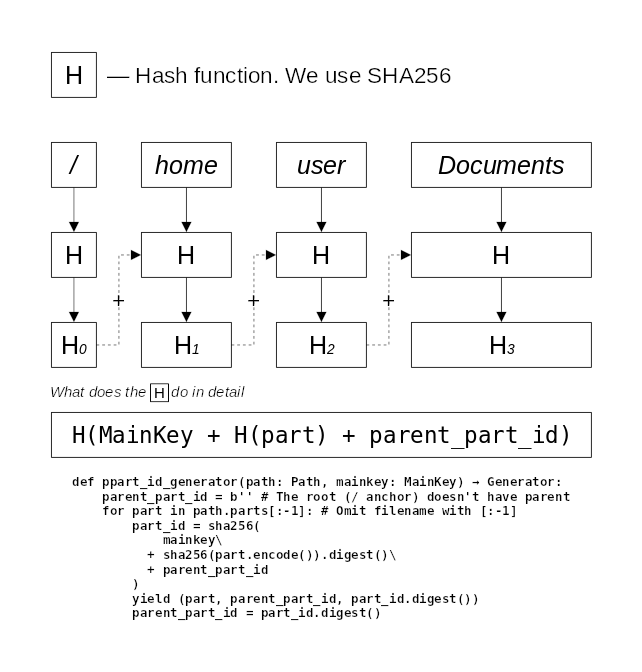
Our file in LocalBox will store last PartID of the Documents folder: H(3) in a PPATH_HEAD column. More simple, this like saying “file.txt located in the /home/user/Documents” without saying /home/non/Documents but still presenting the same information. LocalBox owner will be able to quick-fetch all the local box files and directories in a Documents folder as well as in any other. Try to iterate over all LocalBox contents with DecryptedLocalBox.contents async generator! Look at the brand new (for v1.0 :)) tgbox.api.DecryptedLocalBoxDirectory class. It have a nice iterdir() method.
Warning
In a previous versions we stored just encrypted file paths and FolderID. With this, navigation over files was a really awfull but this had a little benefit: there was a zero information about the file directory structure (because it wasn’t :)). Now, if attacker will have a full access to your EncryptedLocalBox he can read that our file.txt have ENCRYPTED/ENCRYPTED/ENCRYPTED/ENCRYPTED/ENCRYPTED_FILE (the first ENCRYPTED is /) absolute path and nothing more. He will also know that first path part (H(0)) is probably / or C:\\ (anchors), but can’t guarantee this. Attacker without your decryption key will not know any info about the files or folders, even its names. AES CBC that we’re using in TGBOX is resistant to the Known-plaintext attack, so knowing that there might be / will not give any critical information like decryption key.
DEFAULTS
DEFAULTS store some of the default TGBOX values
METADATA_MAX |
FILE_PATH_MAX |
DOWNLOAD_PATH |
DEF_NO_FOLDER |
DEF_UNK_FOLDER |
|---|---|---|---|---|
INTEGER |
INTEGER |
TEXT |
TEXT |
TEXT |
Note
METADATA_MAXis the bytesize limit of the TGBOX file metadataFILE_PATH_MAXis the bytesize limit of the file pathDOWNLOAD_PATHis the default download pathDEF_NO_FOLDERis the default folder when file path is not specified on uploading/importingDEF_UNK_FOLDERis the default folder to which files will be placed on download ifhide_folderisTrue